The HypeFox editor: change any part of your video, then save it for free
Since October 30, every HypeFox video opens in a built-in editor, like CapCut: words, captions, colors, transitions, stickers, your photos, and an AI that makes changes on request. Saving is free.
HypeFox makes your short videos from start to finish. Until last week, changing one thing meant asking the app to redo the whole video. Now you open the video in the editor and change it yourself, as much as you like. Saving the new version is free.
What it looks like
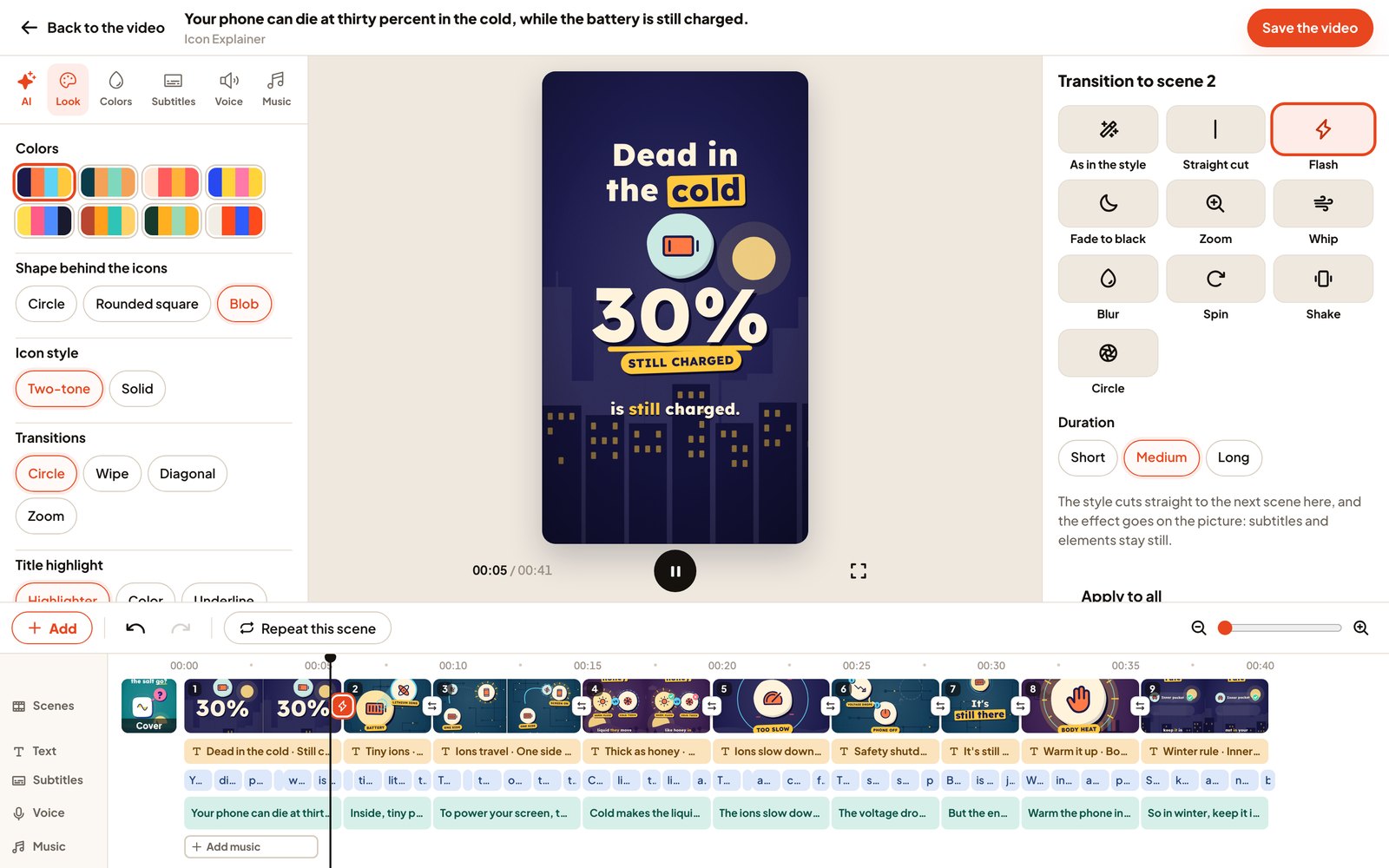
If you've used CapCut, you already know it: the video on top, the timeline underneath with the scenes, texts, captions, voice and music, and the tools around them. It works on a computer and on your phone. Every change shows up right away in the preview. The real video is made only when you press Save.
What you can change
- The words. Rewrite any sentence. When you save, the voice reads only that sentence again, with the same pauses and volume, and the scenes stretch or shrink to fit.
- The look. Texts on screen, colors, and the graphics of each scene: backgrounds, figures, icons, 3D emoji and movements.
- Captions. Fix a word, turn them on or off, pick one of six styles (as in the style, white with outline, with background, highlighted word, big in the middle, typewriter) and drag them up or down.
- Text, stickers and shapes. Highlighted texts in eight looks, stickers (icons, 3D emoji, drawings) and hand-drawn shapes, each with its own time on the timeline. They stay on their words when you change sentences or cuts.
- Your photos and logo. Up to 10 per video, with a border, rounded corners or in a circle. A transparent PNG stays transparent.
- Transitions, scene by scene. Ten to choose from (Flash, Zoom, Whip, Blur, Spin, Shake, Circle, Fade to black, Straight cut or the style's own), three durations, or one for every scene. Captions and elements stay still: the effect moves the picture.
- Voice, speed, music and volumes.
- Title and cover. Keep the cover, or ask the AI for a new one, with up to three reference photos.
Your footage: the AI edits it, or you do
From Editor in the menu, upload or record your clips and choose how long the video can be, from 30 seconds to 3 minutes. Then pick AI edits it (it keeps your best takes, cuts mistakes and pauses, and adds titles, pictures, captions and music) or I'll edit it (your whole footage with captions: cuts, texts, stickers and music are up to you). Either way, you can trim each scene with its handles and take out a sentence with the scissors.
HypeFox AI, inside the editor
Tell it what you want in plain words: "put OFFER on screen at 3 seconds and a flash between scene 2 and 3", "bigger captions", "calmer music". It changes the same things you can change by hand. You see what it changed, then keep it or undo it.
Saving is free
Press Save and the new version is ready in a minute or two. It doesn't use your credits. The previous version stays in the video's history for 30 days, so you can look at it and put it back. If the video was already in your calendar, the new version takes its place, posts included. On the free trial, videos you edit yourself from your footage have 5 free saves.
Which videos open in the editor
Every video made since October 25 in one of the six styles, and videos made from your footage for 30 days. Videos made on your own audio, and the ones in the retired Cartoon Storytime style, keep the Edit this video box.
Also new this week
- Brand colors and logo. Set them once per project: a ready-made palette, your own colors, or colors and logo taken from your website. New videos and covers use them.
- TikTok. On November 2, TikTok approved the HypeFox app. Posting to TikTok works as before while we finish TikTok's last review step.
Why we built it
The first person who found HypeFox on their own asked for a change in the wrong place and lost a video. The next morning we put an Edit this video box online and gave the video back. The requests that came after were small: use only my brand's colors, don't cut my last word, let me fix a caption. A video that's almost right is a video you don't post. So we built the editor, and put the AI inside it.
Open any video and tap the pencil.